Panel spawn actions
Start with the layout, then name the action. This draft maps the basic ways to open a view before deciding artifact-preview reuse or a new API shape.
These are schematic illustrations, not product screenshots. They show relative placement, not exact widths. A and B are existing views; X is the view to open. A white tab is active. Amber marks an active X.
Three starting layouts
- S1 — One view: a single region containing A.
- S2 — Two regions: a list on the left and A on the right. A is the source.
- S3 — Tab group: A and B share one region. B is active and is the source.
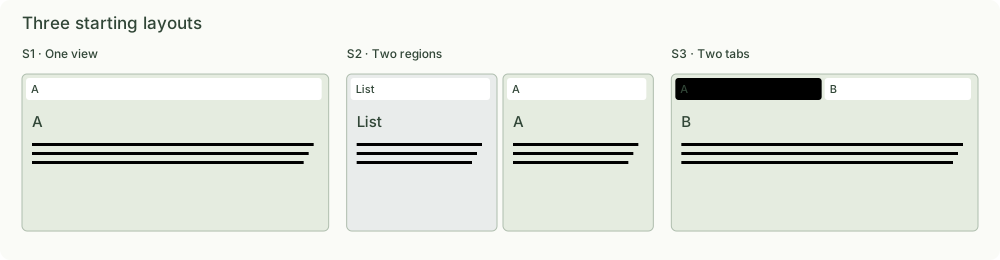
A tab is one view instance. A panel region contains one or more tabs. A split arranges regions side by side or vertically. Spawning beside a tab means splitting its containing region; it does not extract that tab from its group.
The basic actions
For the first three actions below, assume X is not already open.
| Action | Starting layout needed | Result | Current PageViews operation |
|---|---|---|---|
| Open as tab | An existing destination region | Add X to that region and activate it | open with its panelId |
| Spawn right | A source tab or region | Split its region horizontally; put X on the right | split(id, 'right'), then open |
| Spawn below | A source tab or region | Split its region vertically; put X below | split(id, 'below'), then open |
| Activate existing | X already exists somewhere in this layout | Select X in its current region; no new split or tab | activate(tabId) or open with reuse: 'existing' |
“Spawn” here means create a view instance and place it. Moving an existing tab, docking, resizing, and closing are separate actions. Activating a tab and assigning keyboard focus are also separate concerns in the current API.
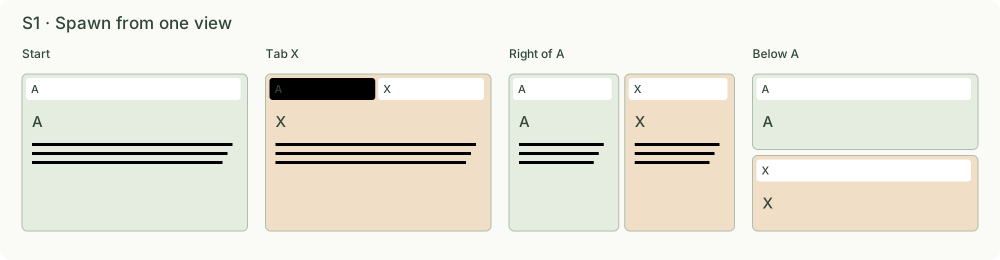
S1 — One view
Starting from A, the three spawn actions produce three different layouts. Opening a tab retains A as an inactive tab; splitting keeps A visible beside X.
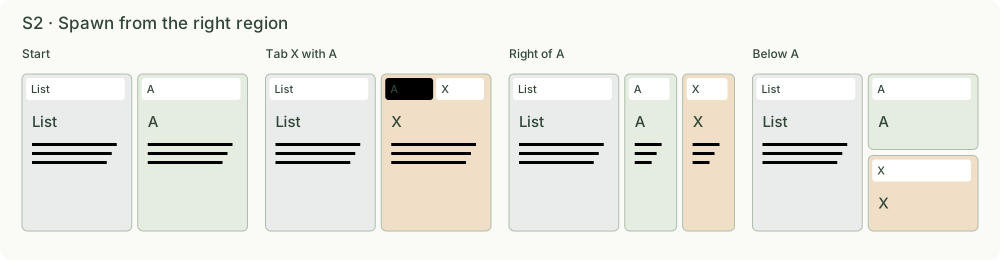
S2 — Two regions
Target A’s region, not the page root. The list remains on the left. Right and below splits divide only the space currently occupied by A.
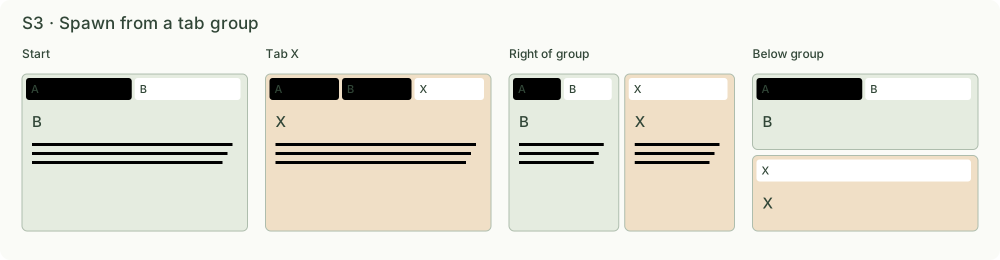
S3 — A tab group
A and B already share a region. Opening X as a tab adds it to that group. Spawning right or below splits beside the whole group; A and B stay together.
When X is already open
This is an independent choice from placement:
- Reuse: activate the existing X wherever it is. Do not move it back beside the source.
- New instance: create another X at the requested destination, leaving the original intact.
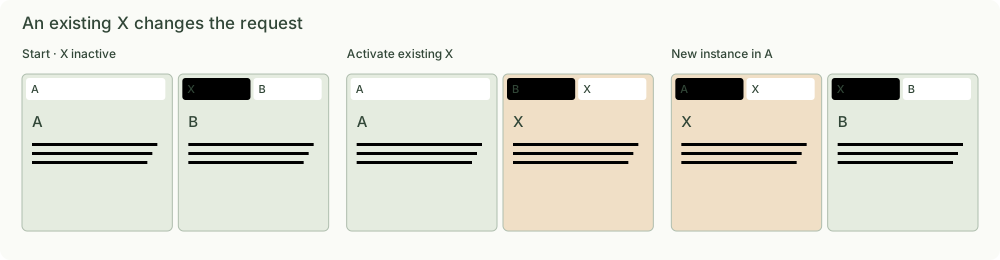
In the activation illustration, tab order is simplified to mark the active view; actual activation does not reorder tabs.
The current reuse: 'existing' searches the entire layout. Resource identity
excludes artifact fragments, so another slide of the same artifact reuses its
tab. reuse: 'new-instance' creates a distinct instance of the same resource.
The destination must still exist, even when a matching resource is already open.
Map the artifact click onto these primitives
For a first artifact-tag click from a note: spawn right of the source.
For another reference to the same artifact: activate existing and navigate.
These are the current openArtifactBeside behaviors.
For a different artifact, the current helper spawns another right-hand region. Once these basic actions are agreed, the next question is whether that click should instead open a tab in an existing preview region or replace a replaceable preview. Those policies are deliberately not decided here.
An ordinary web link retains browser navigation. Opening a generic web iframe is an explicit action and can use the same spawn-right primitive.
Implementation reference and scope
Source inspected in the note-artifact-panels worktree:
components/layout/views/pageViews.ts:open,activate,split, resource identity, andopenArtifactBeside.components/layout/views/PageViewLayout.tsx: native content rendering and shared tab chrome.components/notes/NoteDetailView.tsx: finds the source tab from the clicked reference.- UIKit
PanelLayout: split tree, tab groups, drag, dock, resize, and persistent content surfaces.
Current operations are described, not changed. Right/below opening currently requires two API calls; an atomic spawn request is a possible later design step. No application code or release is included.
No public skill impact: this is an internal layout-design draft, not a change to Notes content operations, CLI/SDK procedures, or distributed skill instructions.