Notes audio playback
Unreleased — 2026-09-27. The Notes title has a borderless waveform button. It opens a player over the document and reads the current note in short passages. This implementation uses ElevenLabs; no browser speech fallback is silently substituted.
Credentials
Set ELEVENLABS_API_KEY and ELEVENLABS_VOICE_ID in the dreamlake-server runtime
secret configuration. For local development use the server's ignored .env file.
ELEVENLABS_MODEL_ID defaults to eleven_flash_v2_5.
Create a restricted ElevenLabs key with text-to-speech access and a provider-side
credit ceiling. Use separate keys for development and production. Restart the
server after changing its environment. Never put the key in VITE_*, the frontend,
a note, source control, or chat. Users use their existing DreamLake login; they do
not supply individual ElevenLabs keys.
The internal browser transport is authenticated
POST /namespaces/:slug/notes/:noteId/speech, with { "text": "A short passage." }.
Unreleased — 2026-09-29: signed-in namespace members and recipients with an
active, previously accepted read or edit share grant can synthesize audio for a
live note. The same access check protects voice options. Membership in the
recipient's own workspace is not required. Anonymous visitors and signed-in
public readers without a share grant cannot synthesize audio. Open the shared
note while signed in to accept its link before using playback. Disabling sharing
or removing the recipient's grant blocks subsequent audio requests; already
buffered audio may continue playing. The existing per-user limits apply equally
to members and share recipients. Voice-options failures display the server's
error without promising that the default voice will work.
Missing key or voice configuration returns 503 with a setup message.
The server forwards to ElevenLabs stream/with-timestamps with pcm_24000 and
streams NDJSON through without buffering a full note. Browser requests cannot
choose arbitrary provider URLs, voices, or models. The client schedules PCM in
Web Audio as chunks arrive. It highlights a passage, rather than attempting
word alignment against Markdown transformed for speech. Provider alignment data
is available in the transport for a future word-highlight mode.
Each request accepts at most 1,500 characters. Per server process, each user has two concurrent requests and a 60,000-character hourly budget. A request is aborted on client disconnect or after 45 seconds. These are process-local safety limits, not globally distributed billing quotas: the provider-side key credit ceiling must be configured before production enablement. The server does not forward provider diagnostics to the client.
Server-side caching — 2026-09-30: completed speech responses (PCM audio and alignment
timestamps) are saved permanently and privately in S3_BUCKET under
speech-cache/v1/<namespaceId>/<noteId>/<sha256>.ndjson. The digest covers the
voice, output format, and exact provider payload (text, model, and surrounding
context). Every replay rechecks current note access; no public or presigned audio
URL is issued. Cache hits avoid provider usage but retain existing playback limits.
New responses stream immediately and are saved only after successful completion;
failed, cancelled, or responses over 16 MiB are not stored. Storage failures fall
back to synthesis. There is no application expiry or automatic deletion for this
prefix; do not apply an expiring S3 lifecycle rule to it.
The response header x-speech-cache reports hit or miss for verification.
No public skill impact: this changes only the internal browser transport, with
no CLI or SDK task contract changes.
ElevenLabs receives the passages requested for playback; its account retention
settings apply. Stopping cancels the current request; text already submitted
may already have incurred provider usage.
Editing and playback
- The caret and normal selection remain independent from the passive playback highlight. Clicking text never seeks audio.
- Typing or scrolling manually suspends follow mode, without pausing audio. Back to audio reveals the current passage and restores follow mode.
- The currently spoken passage finishes from its original audio. Editing inside it replaces the highlight with a side marker. Anchors map through local and collaborative edits. Future passages use the latest document text.
- Read from cursor / selection explicitly starts at the caret or restricts reading to the selection. The selection's end tracks subsequent edits.
- The UIKit slider seeks within the buffered audio of the current passage. This first implementation does not show an estimated whole-note duration.
- Pause/resume and speed changes are local. Released — 2026-10-01, UI PR #658: playback speed preserves voice pitch through client-side time stretching of the PCM stream. The 1× path plays the original audio. Faster rates load a Signalsmith Stretch AudioWorklet/WASM processor; progress stays in original audio seconds while remaining time accounts for the selected speed. Startup waits for the processor and buffered audio, and passage completion drains its output tail. If pitch-preserving processing is unavailable or fails, playback returns to 1× and shows an error rather than raising the voice pitch. The last ten completed passages are cached in memory per mounted note/player and reused when their spoken text matches. Closing clears the cache. Code fences and Markdown destinations are omitted; this is a bounded text normalizer, not a complete Markdown narrator.
Local voice preferences
Unreleased — 2026-09-30: manual speaker and ElevenLabs model selections become favorites saved per signed-in user in this browser's localStorage. On each player opening, an epsilon-greedy bandit picks independently from available favorites: 20% uniform exploration, otherwise the best smoothed preference score (random ties). Changing a selection rewards the chosen option and rejects the replaced option. Automatic picks never count as positive feedback. Choices stay fixed while reading, seeking, pausing, or resuming; removed provider options are excluded.
Memory uses a compact score table (12 favorites per dimension) plus the last 24 manual edits. Scores decay on feedback so recent preferences carry more weight. Account Settings includes a Reading voice preferences section with saved speaker/model names, individual removal, memory usage, and a reset action. These changes apply on the next player opening and do not interrupt active audio. The serialized record is capped at 8 KiB in UTF-8, pruning oldest edits and then least recently selected favorites. It stores IDs, display names, scores and timestamps, never note text or audio. Invalid or inaccessible storage falls back to the existing defaults. A table alone loses the recent change trail; an edit list alone loses learning when pruned. The bounded combination keeps both without replaying a growing log. No public skill impact: this is browser-only playback preference state.
Verification
The UI includes tests/notes-audio-preview, a real CodeMirror + player harness
with a quiet synthetic PCM stream, explicitly labeled as synthetic. It exercises
browser audio, pause/resume, selection, scroll behavior and provider errors
without credentials. It does not prove ElevenLabs voice output.
Pitch signal tests render the real WASM engine with a 440 Hz tone at changed speeds, checking pitch and duration across chunk boundaries, rate changes, underruns, and a 48 kHz context. Worklet lifecycle tests use an empty input list for idle, pause, and disposal, matching the browser buffer-only graph. A Chrome preview measurement of its synthetic 220 Hz stream at 2× returned 219.7 Hz. This establishes pitch preservation for synthetic signals; physical iPad voice quality still requires device acceptance.
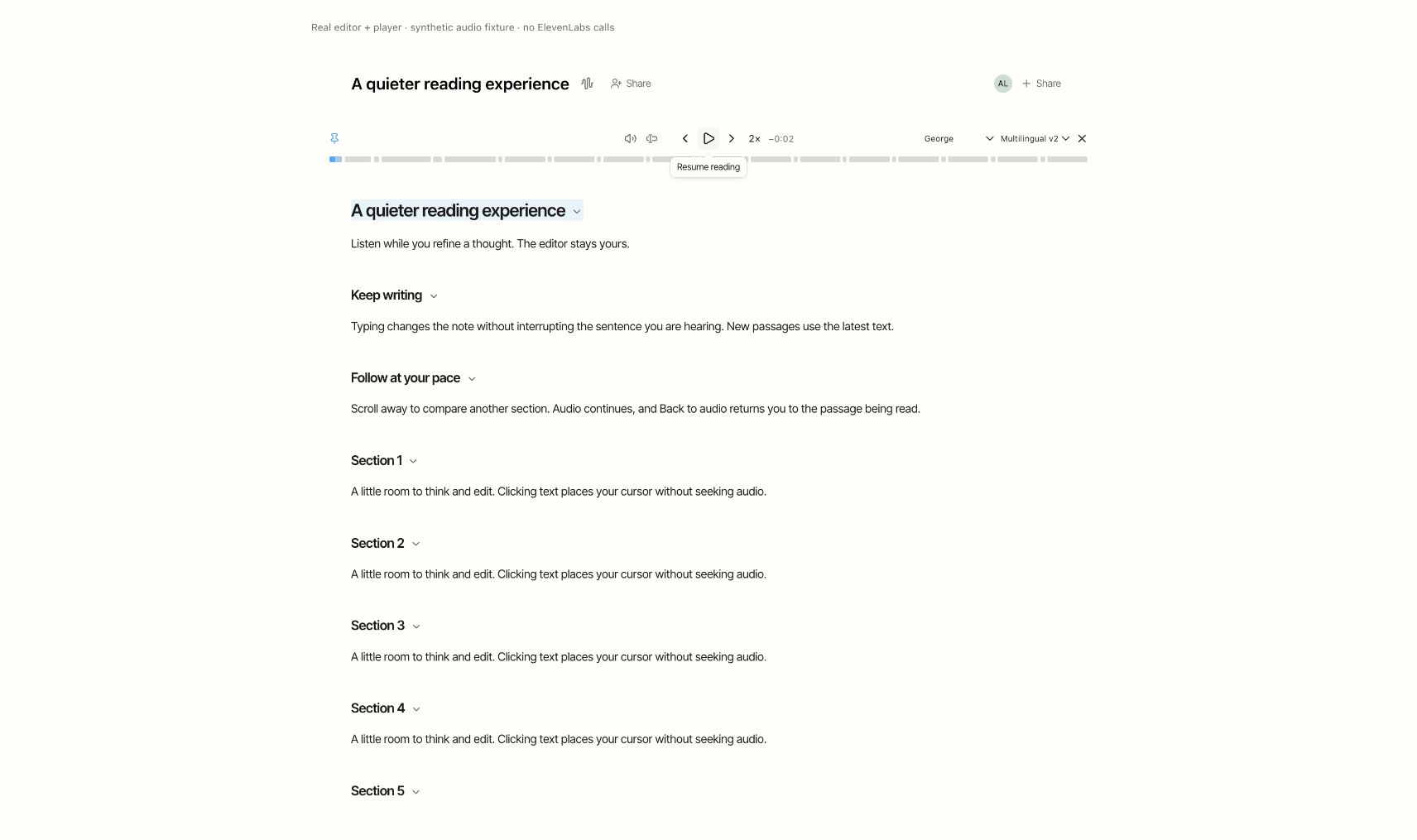
UI tests cover Markdown ranges, edit mapping, packet boundaries, odd PCM byte boundaries, pause/resume and network underruns. Server tests cover access checks, missing configuration, provider error sanitization, request limits and stream cleanup. Live voice acceptance still requires a configured key and voice.
The generated workspace dreamlake reference includes this operations page.
No distributed task-skill impact: this is an internal browser transport and server
operations page. The public Notes document/CLI API and task procedures are
unchanged; no new CLI speech command or SDK contract is introduced.
Browser authentication transport
The application sends OAuth token and user-info requests to the DreamLake API
(/api/auth/oauth2/token and /api/auth/oauth2/userinfo). Authorization still
opens the identity provider. The backend forwards only authorization-code PKCE
and refresh-token grants for VUER_AUTH_PUBLIC_CLIENT_ID to the fixed
VUER_AUTH_URL HTTPS origin. The identity provider continues to validate PKCE,
redirect registration, and tokens.
VUER_AUTH_BROWSER_ORIGINS is a comma-separated exact-origin allowlist. A local
frontend must have its origin configured there and its callback registered with
the identity provider. No Vite proxy is used. Token responses use no-store;
provider credentials and diagnostics are never logged or returned in error text.
Deployment injects ELEVENLABS_API_KEY from the GitHub environment secret and
ELEVENLABS_VOICE_ID / ELEVENLABS_MODEL_ID from environment variables. Voice
listing permission is not needed when an allowed voice ID is already configured.
Inspect and control preference learning
Settings shows saved speaker and model favorites, smoothed preference scores, and up to 24 recent manual changes. The scores count selecting and replacing options; automatic selections never reward themselves. Exploration defaults to 20% among available saved favorites, with 0%, 10% and 20% controls. Keeping recent change records can be turned off independently of learning. Clear recent changes preserves favorites and aggregate scores. Removing a favorite also removes records involving it; Reset voice preferences forgets favorites, scores, records and restores default settings. Storage remains bounded to 12 speakers, 12 models and 8 KiB per account in this browser. Changes apply the next time the audio player opens.
Volume and iPad playback sessions
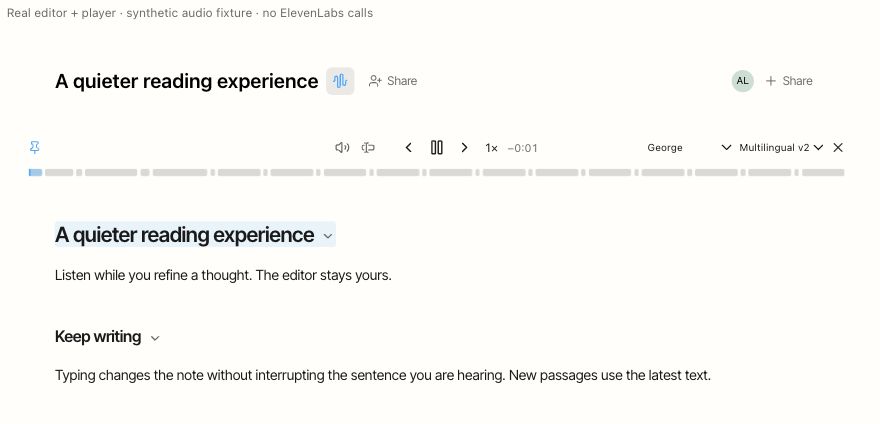
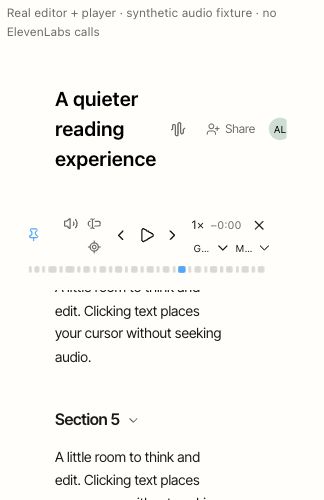
Released in UI PR #647, 2026-10-01. The Notes player centers Play between previous/next paragraph controls. Pin stays at the far left. The cursor group (Read from cursor / selection and conditional Back to audio) precedes the volume/speaker control in both visual and keyboard order. A 12 px spacer sits immediately before the speaker icon: after Read from cursor / selection normally, and after Back to audio when it appears. The speaker icon sits immediately left of the playback controls. Speed and remaining paragraph time sit right of Play. Remaining time accounts for playback speed and describes the buffered paragraph, not the entire note. Voice and model selectors have up to 90 px each and shrink to 40 px in narrow panels; very narrow panels place them on a second row. These layout refinements ship in UI PR #651. The Notes Share trigger shows a person-plus icon without presence avatars and a plus icon alongside visible avatars; sharing permissions are unchanged. Tap the volume button to open the slider and mute/unmute control. Unmuting restores the last nonzero level without restarting streamed or cached audio.
Speech requests navigator.audioSession.type = 'playback' when available.
iPadOS can otherwise silence default Web Audio in Silent Mode, even while
media in another tab remains audible. See WebKit issue 237322.
The previous session type is restored when the last Notes player closes.
Browsers without the Audio Session API keep the existing audio path; disabling
Silent Mode is a workaround on older iPadOS versions. Physical iPad verification
is still pending; desktop tests do not establish device audibility.
No public skill impact: this changes the browser UI and playback session, with no SDK, CLI, or API contract changes.