Panels and agent control
DreamLake views use the native UIKit panel surface: drag, dock, resize, tab and close work the same for note editors, note lists, artifact views and explicitly opened web previews.
The UIKit layout controller owns destination addressing and the forkable starting-layout → command → result catalog. DreamLake supplies resource descriptors, view loaders and interaction policies. The TabbedContainer component presents those alternative scenarios in the docs.
Share the current view
The address carries the panel tree and its display state. After opening, closing, tabbing or resizing views, copy the current address to reopen that arrangement. It restores sidebar collapse and folds, list search/filter/order and selection, and note/list scroll positions. Folder and project location stay in the ordinary route. Changes settle for 250 ms, then the latest snapshot is encoded during idle time; scrolling does not compress or rerender on every event.
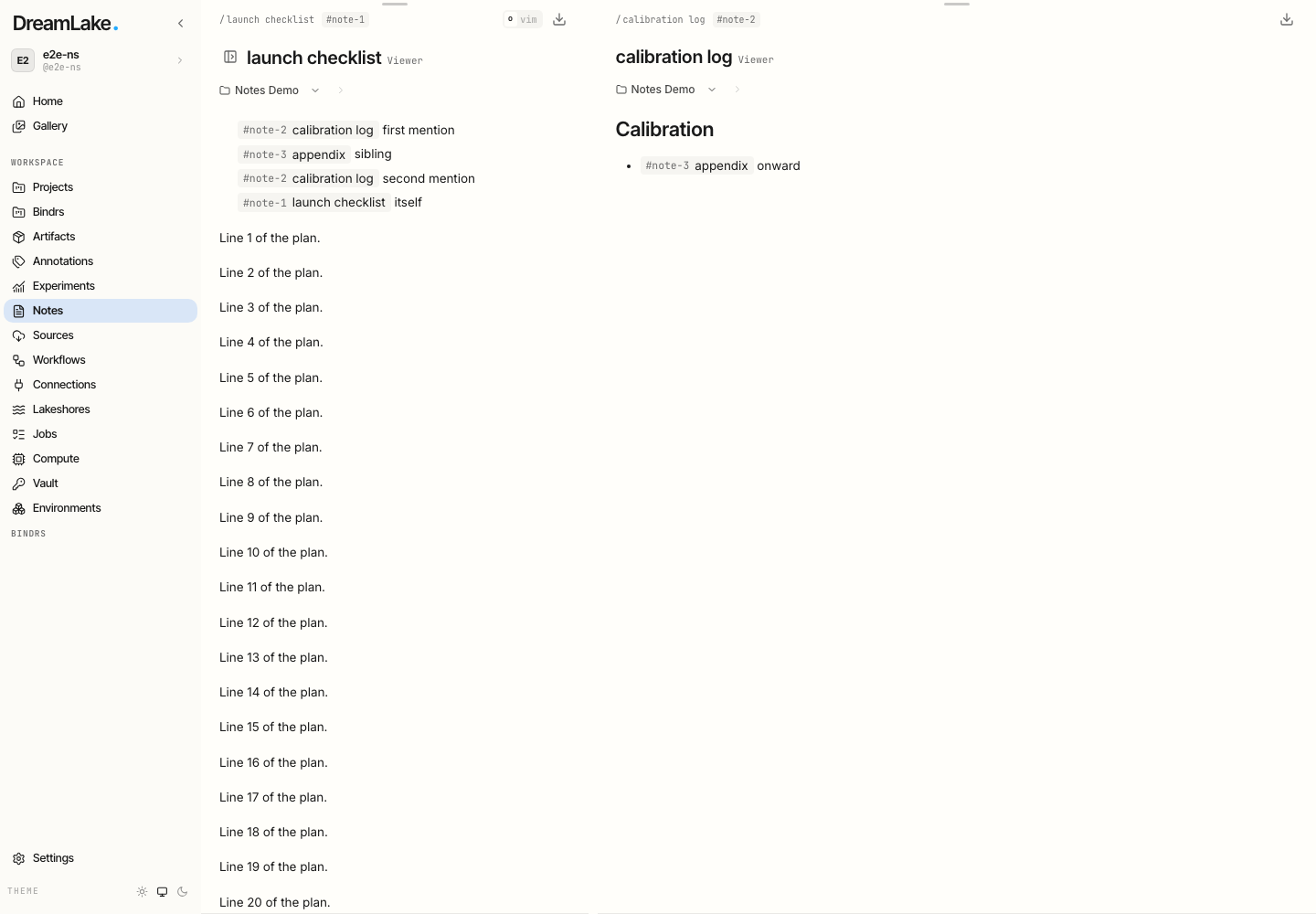
Two exact note references, restored at 35/65 width. The route supplies the primary note ID; auxiliary references retain full IDs. Repeated strings compress through references to earlier sequence segments. Artifact query strings and fragments travel with their references. Internal iframe state requires the artifact to represent it in that address; the host does not introspect iframe memory.
Sharing a view grants no additional access. Unavailable auxiliary notes leave empty panes or are omitted from a populated tab group, while the primary note keeps its normal access flow. No catalogue lookup or fuzzy ID resolution is needed. The codec caps the escaped layout value at 32,000 characters and the decoded form at 64,000; these are application limits, not a universal browser URL guarantee. If a layout is unsupported or exceeds the cap, the last usable URL is retained. Existing version 5, DEFLATE and prototype layout links remain readable.
Artifact references
Clicking an artifact tag in a note opens its artifact beside the source note. The default request first activates an existing instance of that artifact. A fragment such as a slide or section navigates that same mounted view.
For a different artifact, the request chooses the latest preview destination associated with that source note tab. It replaces an eligible unpinned preview. Pin the current tab to retain it; the next artifact then opens as another tab. Dragging a preview out preserves its named association and role, so subsequent requests can target the original destination, the last one, or a spatial match. The UI default is the last destination for that source instance.
Pinned tabs can still be moved or explicitly closed. Notes that are still syncing retain their disposal guard. A failed replacement or stale layout leaves the existing view intact. Ordinary web links keep browser navigation.
Note and web-preview references
Note tags and :preview[https://example.com/#section] open new targets as tabs
in the existing panel on the right, creating a right-hand panel only when one
is absent. Clicking an already-open target activates it. Different preview URL
fragments are separate tab targets. Opening either kind of reference from a
side Note adds a tab in that same side panel. Existing tabs stay mounted and
retain editor and preview state; these reference clicks do not replace content.
Agent requests
Each mounted PageViewLayout registers in window.dreamlakeLayouts protocol v1.
Agents select a layout, inspect its revision and flat regions, resolve a request
without mutation, then apply it with an optional expected revision. Page reloads
and unmounts invalidate session IDs; list and inspect again instead of guessing.
Use CLI layout control for an explicitly selected local browser debugging session. Remote unattended control is not part of this transport. A successful layout request means placement was accepted, not that an artifact's asynchronous authorized loader succeeded.
| View kind | Resource identity | Required content metadata |
|---|---|---|
| note | note ID | namespace, noteId; optional fragment |
| artifact | namespace/artifactId | namespace, artifactId; optional fragment |
| resource | namespace/notes | namespace, resource: notes |
| web-preview | normalized URL, or blank for an empty preview | url |
The application validates descriptors and their resource identity before changing the layout. Inspection exposes descriptors, pins and layout metadata—not note bodies, credentials, share tokens, editor state or iframe authorization context. Applications can supply additional content metadata to the generic UIKit layer; DreamLake's current descriptor table above defines what this adapter exposes.
Layers and ownership
- UIKit PanelLayout handles low-level geometry and interaction mechanics.
- UIKit's controller handles named families, original/first/last, spatial and content queries, placement scope, reuse, pinning and guarded mutations.
- DreamLake handles target validation, content loading and the default artifact click policy. Notes content remains governed by the normal revision and authorization contracts; layout control cannot grant access to a resource.
The generic request reference lives in UIKit; CLI connection and command recipes live in the CLI docs. This page describes DreamLake's integration rather than maintaining a second copy of either API.