Test hosts and tracked runs
Tracked-run submission, status, logs and cancellation have shipped since CLI 0.13.0 and Python 0.10.0. Use Python 0.16.2 or later for the noninteractive ProxyJump fix. Use an explicitly selected test host and compatible server. A running public control plane does not imply the main server has host/run APIs or current schema. Do not point these tests at production by default. Enrollment explains the implementation and delivery boundaries.
For the commands below, use released CLI 0.21.2, Python 0.16.2 and Nymph 0.1.8. The CLI publication receipt covers native/npm latest; the stable channel remains 0.21.0. The Nymph release receipt includes exact checksums and a scratch-install command; all public artifacts match the reviewed manifest. These version pins do not upgrade an existing host or prove hosted recovery. Dated receipts below retain the versions actually tested.
Python SSH authentication checks
Install the published SDK in a fresh environment:
Expect 0.16.2. Python requires noninteractive key or agent access for both target and jump host; password-only access must fail without a terminal or GUI prompt. The CLI continues to support interactive password authentication.
For repeatable transport acceptance, use the tag-pinned SDK procedure and committed OpenSSH fixture. The fixture checks direct/jump passwords in the CLI, SDK no-prompt rejection, and key/agent success. It creates temporary loopback SSH servers and cleans them; systemd is stubbed, so this is not machine enrollment or reboot proof. Remove only the disposable .venv-host-check when finished.
Open staging run 6aa90495100be79cea5a92bf, verified in the signed-in browser. It separately records a real process through published Python 0.16.2: succeeded, exit 0, stdout DreamLake Python 0.16.2 live acceptance. Use an authorized staging account to review the existing record; no resubmission is needed. Evidence and remaining scope.
Real SSH enrollment
Choose an authorized disposable Linux account with SSH access, Python 3, OpenSSL, and a user systemd manager with administrator-enabled linger. If nymph is absent, enrollment downloads the requested version into the account’s local bin directory. Provide uv separately in the user service environment before testing tracked runs. Configure your client for the intended main server and account. The target must reach its configured control plane. Check SSH before starting; Python requires noninteractive key/agent authentication.
ssh test-host true
dreamlake hosts enroll -p ge/testing -n test-host --ssh test-host \
  --request-id manual-host-test --nymph-version v0.1.8
dreamlake hosts status ge/testing/test-hostfrom dreamlake import DreamLakeClient
client = DreamLakeClient()
result = client.hosts.enroll(
"ge/testing/test-host", ssh="test-host", request_id="manual-host-test",
nymph_version="v0.1.8",
)
assert result["status"] == "online"
print(client.hosts.status("ge/testing/test-host"))Repeat the identical request while its receipt is valid: host/enrollment IDs must stay stable. Inspect the generated dreamlake-host-*.service in the target user's ~/.config/systemd/user; restart that exact test service and verify a new heartbeat with the same identity. Test reboot recovery separately. A heartbeat proves connectivity, not successful execution. Cleanup stops only that exact disposable service; do not disable a shared cluster daemon or delete another user's identity.
The published installer acceptance procedure checks fresh CLI and Python bootstrap paths on separate accounts, installed binary hashes, mode-0600 files, stable replay and a new signed heartbeat after removing the bootstrap token. Require a successful tracked run as well. Service restart does not establish machine reboot recovery.
Run a small script
The selected host must advertise tracked-run and uv capability. Create hello.py containing print("hello from the remote host"); keep it outside Git to check explicit source staging. Replace the example namespace/host with your authorized target.
dreamlake run --target ge/testing/test-host --include hello.py \
  --request-id manual-run-test --uv-run --no-project hello.py
dreamlake runs status "ge/$RUN_ID" --json
dreamlake runs logs "ge/$RUN_ID" --jsonrun = client.runs.submit(
"ge/testing/test-host", kind="uv-run", argv=["--no-project", "hello.py"],
include=["hello.py"], request_id="manual-run-test",
)
result = client.runs.wait("ge", run["id"], timeout_seconds=60)
assert result["status"] == "succeeded" and result["exitCode"] == 0
page = client.runs.logs("ge", run["id"])Expect the printed remote output, a durable run ID, succeeded, and exit code0. No files beyond explicit inclusions are uploaded; source limits are100 files and1MiB total. Everything after --uv-run or --uvx belongs to the workload. Log pages contain base64 bytes for separate stdout/stderr streams; follow nextCursor until done, using an incremental decoder if rendering text.
For cancellation, submit a script that sleeps using CLI --no-wait or Python submit, then call dreamlake runs cancel "ge/$RUN_ID" or client.runs.cancel("ge", run_id). Poll until cancelled; cancel_requested alone is insufficient. A failed script should return its nonzero exit code. Local wait timeout does not cancel remote work.
Inspect recovery without submitting again
Set RUN_ID to your original run ID and replace ge with its namespace. Keep that ID after a connection loss or worker restart. Read it again; do not repeat submission with a new request ID. On a compatible server, recoveryObservation explains why an admitted run is still uncertain. It is not a terminal result or proof that the process stopped. A genuine completed result clears the observation. A local wait timeout does not cancel the remote run.
dreamlake runs status "ge/$RUN_ID" --json
dreamlake runs logs "ge/$RUN_ID"run = client.runs.status("ge", run_id)
print(run["status"], run.get("recoveryObservation"))Open the same run-detail URL in the UI and refresh. When the server reports recovery uncertainty, the warning must remain after reload; only an authoritative terminal result clears it. Do not infer a cancellation from cancel_requested alone.
Full recovery acceptance — A runnable isolated test connects real API, control plane, Nymph, CLI, Python and browser. It checks one launch total across daemon crash/restart and warning removal after replaying a retained genuine result, with screenshots and cleanup. Its storage rollback case is an explicit fault injection. Run it on disposable local fixtures, not an enrolled shared host; it does not establish hosted recovery deployment.
Review the hosted recovery record
Open production run 6aa93b7ab30c4066ffc61361 using the authorized geyang account. Published Nymph 0.1.8, CLI 0.21.2 and Python 0.16.2 observed one launch across an owned daemon SIGKILL and systemd restart. The UI retained stdout and the Reconciliation required warning after a full reload. The stored status is running with no exit code; it does not mean the interrupted payload is still alive.
Read the existing record without submitting or cancelling anything:
dreamlake runs status geyang/6aa93b7ab30c4066ffc61361 --json
dreamlake runs logs geyang/6aa93b7ab30c4066ffc61361from dreamlake import DreamLakeClient
client = DreamLakeClient()
run = client.runs.status("geyang", "6aa93b7ab30c4066ffc61361")
print(run["status"], run.get("recoveryObservation"))Expect reconciliation_required / prior_boot_admission, observed at 2026-09-15T12:35:44.499Z, with retained logs. No authentic terminal result survived this hosted interruption, so warning clearing is established by the isolated full-chain test above, not this run. Do not resubmit to resolve uncertainty. The sanitized hosted receipt and read-only verifier record one marker after the deadline, no remaining payload process, unchanged other daemons and removal of the temporary SSH rule. A separate intentional post-restart hello succeeded; it does not resolve the original run.
Check published clients on an enrolled test host
Use published-client-acceptance.py from a workspace checkout. This test submits eight short synthetic runs to the exact host you name. It does not enroll or restart a worker. It checks explicit file selection, unchanged arguments, stable replay, log cursors, failure exit 7, remote timeout and confirmed cancellation. Only its own runs may be cancelled; durable run records remain afterward.
Install the released clients in a temporary directory:
Create a protected host-test-session.json containing remote (the HTTPS main
API URL), namespace and your test account's token. Keep it outside your checkout
and out of shell history. Then run:
Require passed: true, cleanup: true and terminal states for all eight recorded
run IDs. A local timeout is not proof the remote task stopped; inspect the recorded
IDs before retrying. This checks an existing process worker. It does not verify
fresh enrollment, installer/reboot recovery, Slurm/GPU execution or production
readiness.
Repeatable isolated acceptance
The committed harnesses use real main HTTP/JWT routes, disposable persistent MongoDB, a signature-required control plane, the actual nymph binary, and uv. Only SSH/systemd transport is adapted locally; they do not prove Linux supervision or real remote SSH. Their fixture setup and protected credentials are separate from production configuration.
- Backend fixture setup — Operator prerequisites and acceptance commands from backend PR #281. A public endpoint does not establish that rollout; use a configured disposable test server.
- CLI acceptance script — Builds a disposable worker and checks explicit source, argument vectors, logs, replay, failure, uvx, timeout, cancellation, and denied access.
- Python acceptance script — Equivalent actual-service tests; local adapters and cleanup are committed with the script.
Build nymph from the tested source and ensure uv, Python 3, and OpenSSL are available. Obtain a test namespace, its Lakeshore connection ID, a member token allowed to enroll/run, and an outsider token from the test server's operator. Create your own protected configuration; no coordinator temporary files are required:
Run from each corresponding repository. These examples require an isolated loopback API; the drivers do not create database infrastructure or obtain account credentials:
pnpm install --frozen-lockfile
pnpm build
node scripts/test-runs-integration.mjs run-test-env.json /path/to/nymphuv sync --extra dev --extra dreamdb
uv run python scripts/test_runs_integration.py \
--env-file run-test-env.json --nymph /path/to/nymphExpect a JSON success summary and a zero exit status; first use can take several minutes, including package access/cache for the Ruff uvx check. The harnesses stop their disposable nymph services and remove temporary source/identity files; records remain in the disposable databases for inspection. Stop the fixture processes and remove only their dedicated database directories after review. A failed or interrupted run requires checking for remaining test services before cleanup. Delete your run-test-env.json afterward; never print it or pass bearer tokens as command-line arguments.
Production control-host review
On September 15, released Python 0.16.2, CLI 0.20.1 and nymph 0.1.6 passed no-save enrollment and process execution on geyang/bos14/bos14-ctrl. The host reconnected with the same identity; three existing bos14 daemons retained their PIDs and configuration. The signed-in browser verified the host heartbeat, SDK success with both streams, and terminal cancellation. These are production control-host diagnostics, not Slurm allocation or a production-machine reboot. Use the authorized production account; staging credentials and namespace differ.
| Review record | Expected result |
|---|---|
| Python hello | succeeded, exit 0, hostname/user and separate stdout/stderr |
| CLI hello | succeeded, exit 0 |
| Cancellation | cancelled, exit -3, terminal action disabled |
| Intentional failure | failed, exit 7, expected stdout/stderr |
| Bounded timeout | timed_out, exit -2, expected stdout |
Review the retained records without submitting new work. With the production client environment already configured:
The failure and timeout were also verified in the signed-in production browser.
Their sanitized receipts
and replayable scripts
retain the exact payloads. To deliberately create a new pair of bounded runs,
set DREAMLAKE_REMOTE=https://api.dreamlake.ai, provide DREAMLAKE_API_KEY through
your secure local environment, and run from examples/host-run-demo:
Only the selected payload is uploaded. The failure intentionally exits 7; the
12-second sleep has a 3-second remote limit and must report timed_out, not just
any failure. The verifier requires those exact statuses and diagnostic output.
A local wait timeout does not cancel remote work; inspect its printed run ID.
For machine reboot acceptance, the separate disposable-EC2 procedure and evidence prove a changed boot ID, unchanged identity, no bootstrap grant, a fresh signed heartbeat and successful hello. The subsequently strengthened heartbeat/cleanup guards have offline tests; that stronger script revision was not rerun on another billable VM. Do not equate this isolated reboot with rebooting the retained production host. Ge review remains pending.
bos14 control-host acceptance
On September 15, 2026, released Python SDK 0.16.2 and CLI 0.20.1 both ran
an explicitly uploaded hello.py on
ge-yang-d4c5da/bos14/bos14-ctrl.
Both receipts show succeeded, exit 0, hostname
bos14-ctrl-000.bos14.internal, Unix user geyang, and separate stdout/stderr.
These are small process diagnostics on the control host, not Slurm allocation
or compute-node acceptance. Login with an account authorized for the staging
namespace to inspect the records.
| Client/check | Retained receipt |
|---|---|
| Python 0.16.2 hello | 6aa905991a2141d8f981ba86 |
| CLI 0.20.1 hello, followed by status and logs | 6aa905e71a2141d8f981ba87 |
| Python cancellation after observing a bounded sleep running | 6aa9061e1a2141d8f981ba88: cancelled, exit -3 |
Reproduce the bounded hello
Use the example scripts.
Set DREAMLAKE_REMOTE=https://staging-api.dreamlake.ai and supply
DREAMLAKE_API_KEY through your existing secure local environment; do not put
the token in a command argument. From examples/host-run-demo, the following
uses temporary client packages without changing a global installation. Choose
a fresh request ID for a new run and reuse it only to retry that same operation.
Preserve existing services during enrollment
The dedicated enrollment used ssh="bos14-ctrl", save_credentials=False,
nymph 0.1.6, and the existing execution-capable Lakeshore connection
6aa64f45bb6b4dd839157e21. Queue-only mounts cannot enroll hosts or execute
tracked runs. Its per-host identity and systemd unit are separate from the
existing bos14-nymph.service Slurm daemon and Vault workstream host. Baseline
and post-run comparisons confirmed those services' PIDs, unit/config hashes,
and the shared nymph binary hash stayed unchanged.
The account's Snap uv was broken. This enrollment therefore uses a private
copy of nymph and checksum-verified uv 0.8.15 in its own host-state bin
directory. A drop-in for only its generated dreamlake-host-*.service overrides
ExecStart to that private nymph and prepends that private bin to PATH.
This survives regenerated unit files without changing the global PATH or other
daemons. On another host, derive the exact unit and state directory from that
host's enrollment; do not copy bos14's identity files or restart a shared unit.
Python 3, OpenSSL, a working user systemd manager, and linger were verified.
Restart and fresh-heartbeat checks passed; machine reboot recovery remains a
separate check. The retained host's current online state must be checked live.
Review the live host UI
Compute is available on production in your authorized namespace. The historical execution examples below use staging and the account authorized for ge-yang-d4c5da. Production and staging have separate login/namespace contexts. The links do not grant access. The examples exercise host inspection and run monitoring; browser-based SSH enrollment, run submission, and a server-backed run list are separate work.
Compute
Production migration: frontend PR #310 is deployed. Legacy list and detail URLs redirect to Compute while preserving the host ID and query string. The staging Compute links below require a separate rollout; until then its earlier /:namespace/hosts view remains available.
Open production Compute, replacing geyang with your namespace. After the corresponding staging rollout, use staging Compute for the demo inventory. Search host paths, IDs, machine IDs or status. Plain text matches substrings; * matches any text and ? one character. For example, ge-yang-d4c5da/demo/* selects a group and offline finds offline hosts. The eyebrow shows the shared parent prefix of the matching hosts.
The UI loads all API pages into one scrollable list; there are no page controls. Inventory refreshes every ten seconds while the tab is visible, with a manual Refresh action. Open a host to inspect its Unix-user enrollments, machine IDs, verification state and last heartbeat. Online confirms a verified Nymph heartbeat; it does not prove uv capability, workload readiness or SSH availability. Enroll host opens the existing CLI/SSH handoff. Tracked runs opens run lookup; browser SSH and run submission remain separate work.
The demo host, ge-yang-d4c5da/demo/dev-runner, uses a dedicated Linux account and the public development control plane. It does not depend on a laptop tunnel. Its online state is time-dependent; check the current heartbeat.
Tracked runs
Open staging tracked-run lookup, then enter a run ID from the CLI. The detail page shows persisted status, target identity, logs, result, and exit code. A failed request must not be presented as a successful run or confirmed cancellation.
These records came from real SSH, systemd, and nymph execution on the demo host:
| Record | Expected result |
|---|---|
| Success | succeeded, exit 0, short stdout/stderr |
| Failure | failed, exit 7 |
| Cancelled | cancelled, exit -3 |
| Bounded heartbeat | Running during the review window; ends around September 13, 2026, 08:46 UTC, with logs retained |
The heartbeat is time-limited. A later terminal state is expected; use a fresh authorized disposable run to test active cancellation.
Verified screenshots
Captured from staging on September 13, 2026, using the earlier Hosts view. These are historical execution receipts, not screenshots of Compute or a promise that the demo host remains online. New Compute review screenshots in PR #310 use synthetic data.
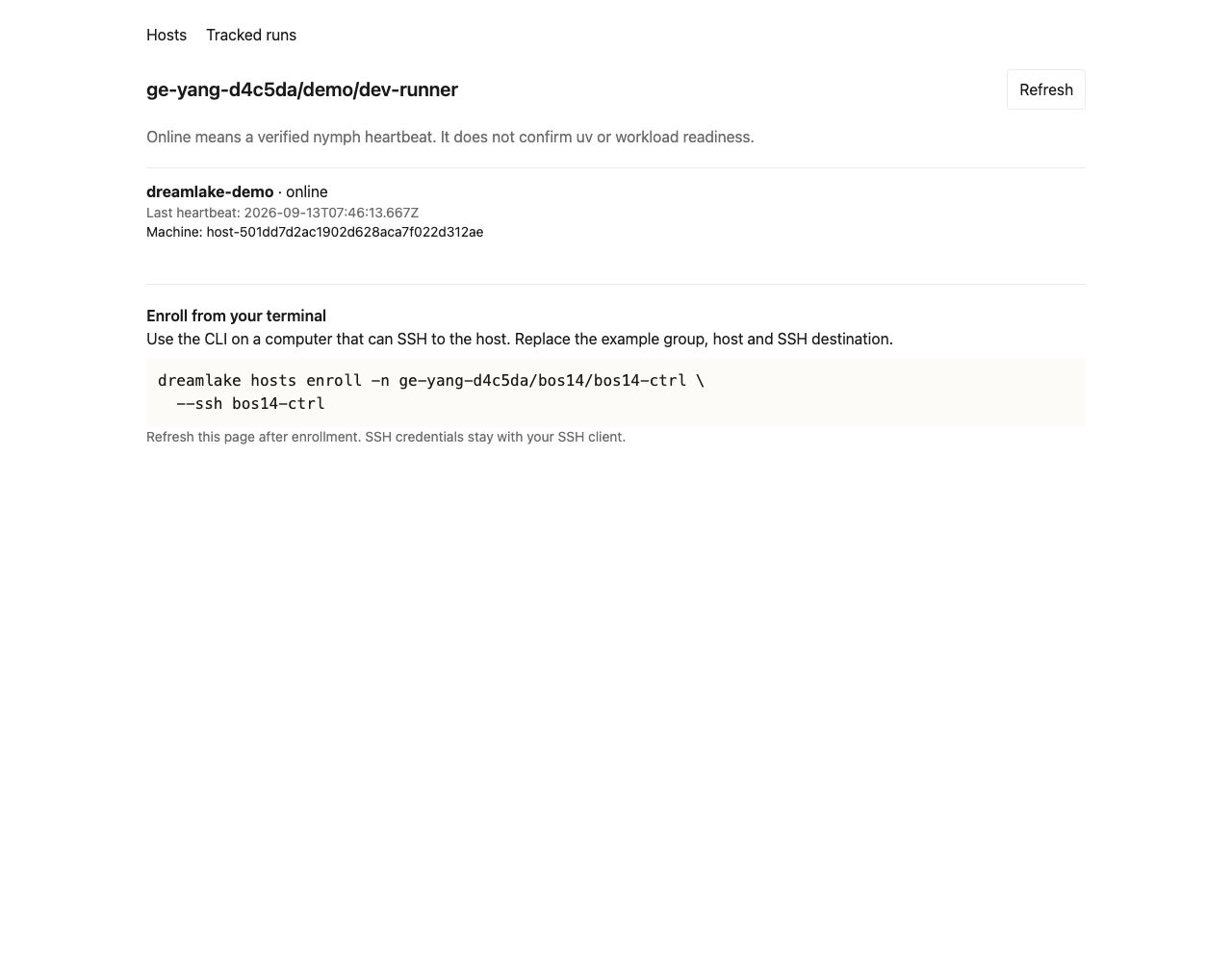
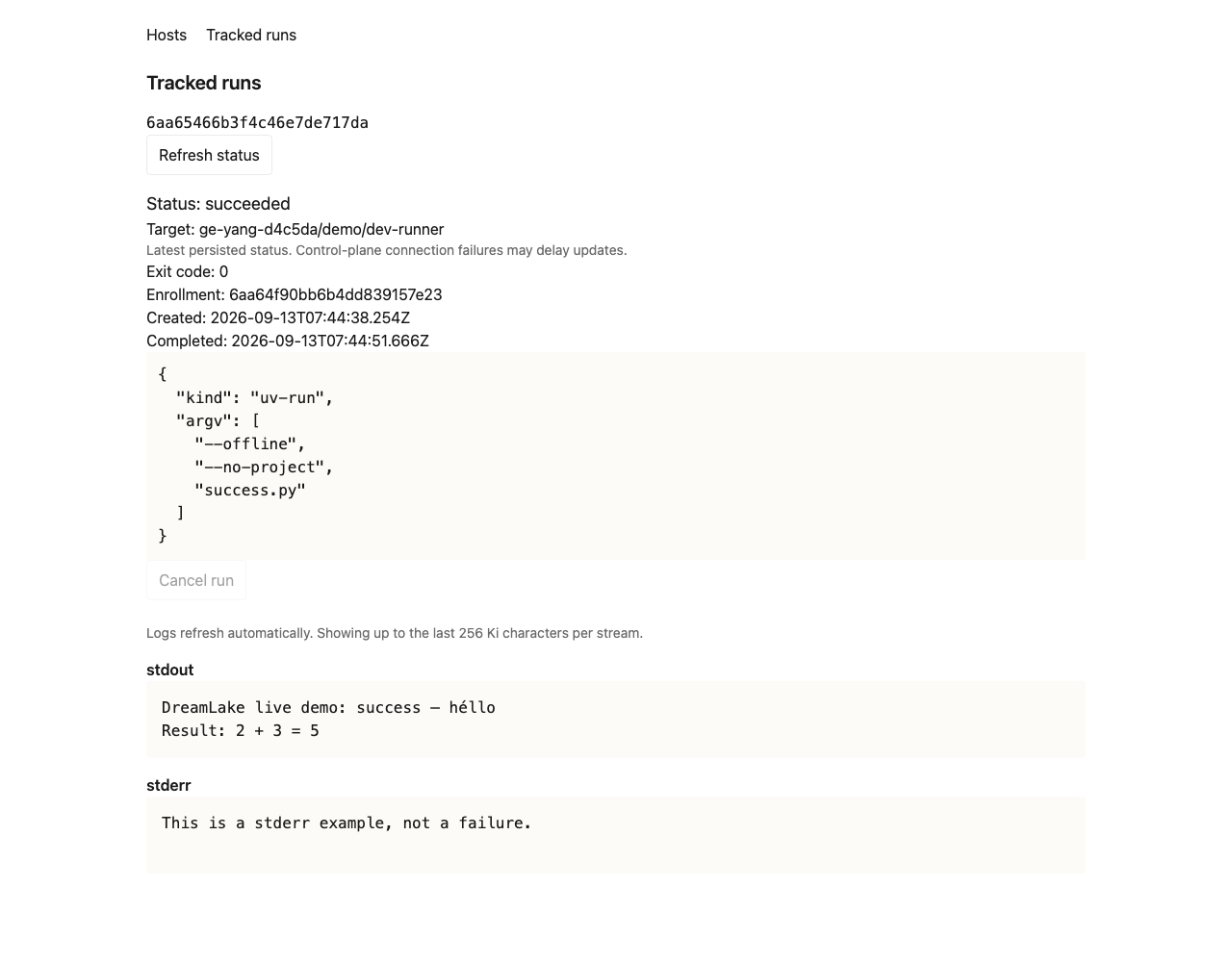
Failure screenshot · Cancelled screenshot
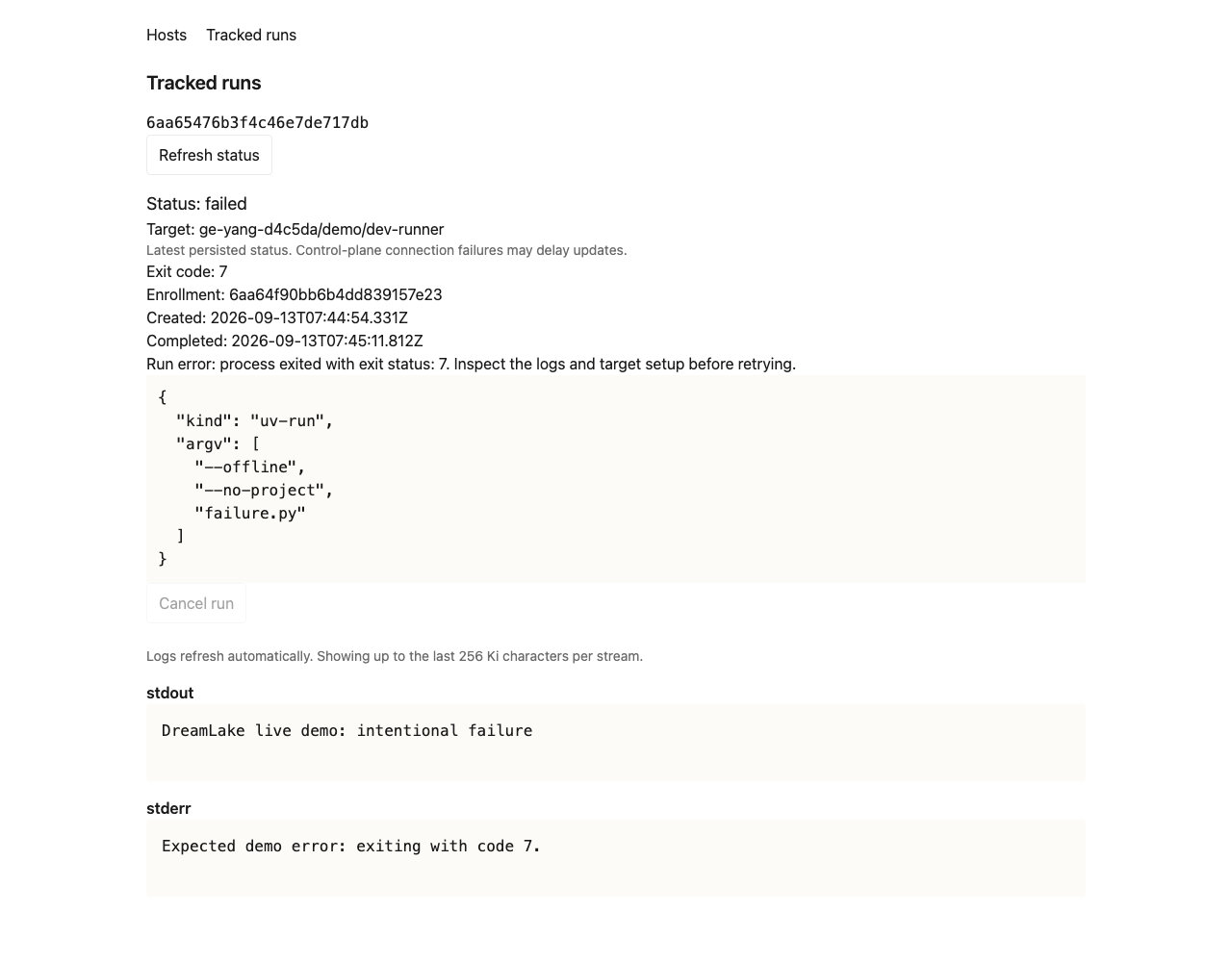
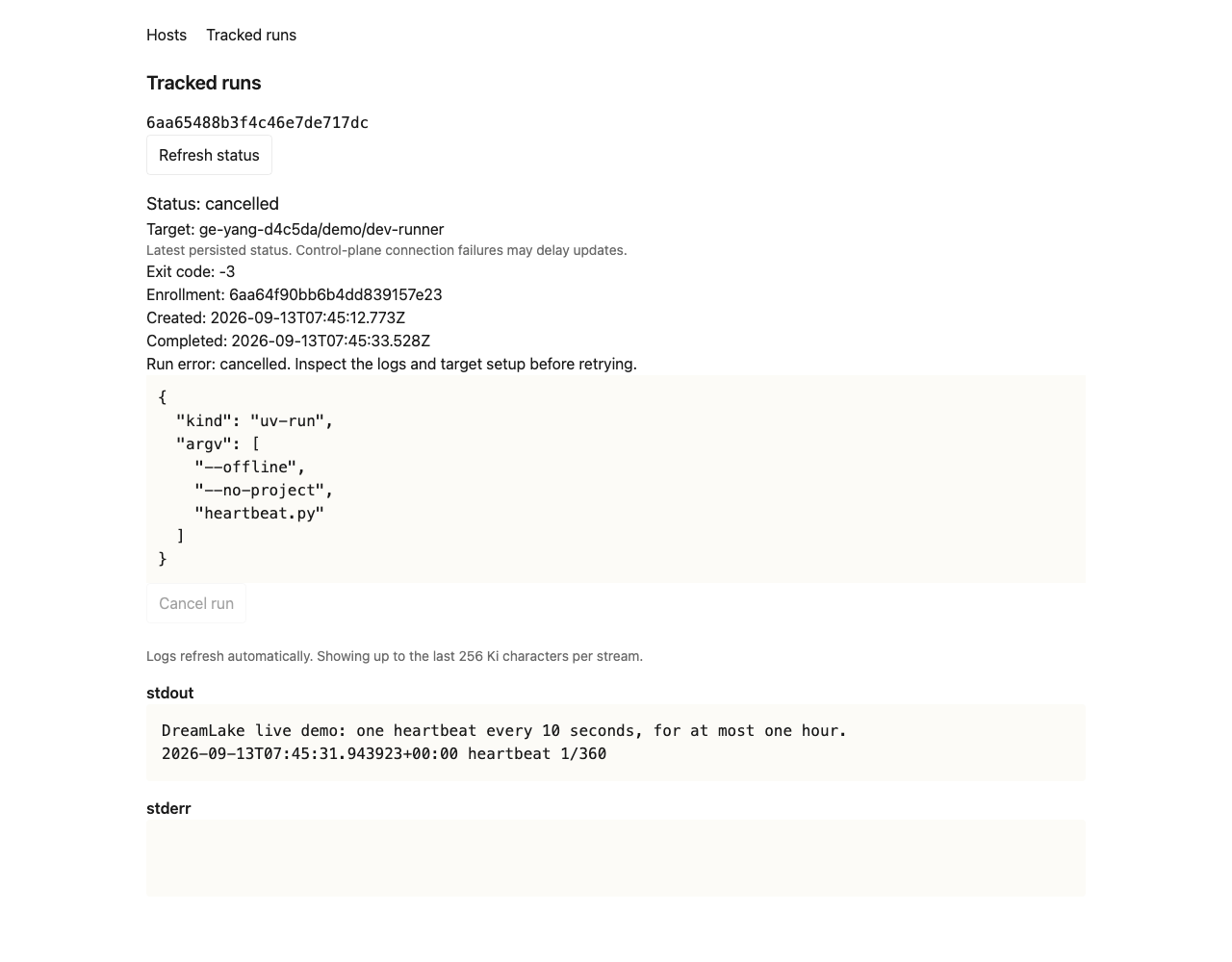
How to test
- Open Compute, search a group prefix with
*, and open a host detail page. Confirm the URL identifies the same host after reload. - Open a known successful run. Confirm its terminal status, exit code, and stdout/stderr; reload and verify the same server record and output.
- Inspect a failed run. Confirm its failure reason or nonzero exit code remains visible.
- For an authorized disposable running job, request cancellation once. Distinguish “Requesting cancellation” from the server's
cancel_requested, then wait for a terminal result. Do not cancel another user's workload. - On a temporary connection failure, verify stale/error handling and recovery without resubmitting work. Signing out or changing accounts must not retain the prior account's data.
The committed demo scripts produce small success, failure, and cancellation workloads. For repeatable source-based checks, use Test hosts and tracked runs and its committed manual scripts. See the basic UI design for the deliberately limited first slice.